
Meta Connect 2026: Muse Charms and Meta Launches Glasses, More Glasses, and VR

Context
Meta has been investing in XR wearables for so long that it no longer seems odd that the social media advertising company is named after the metaverse rather than any of its apps and services. Facebook became Meta as a bid to create a platform the company could control and when it became clear that “the metaverse” wasn’t going to be that platform, investment shifted to smart glasses. That worked, up to a point. Meta is the leading smart glasses company by nearly any measure and it maintains the largest installed base of VR headsets with Quest as well. However, XR is getting crowded and Google/Samsung, Google/XREAL, and Apple all have wearables in various states of readiness (Apple behind closed doors, naturally). At its annual developer conference, Meta got out ahead of the coming competition with new smart glasses styles including models without cameras, Hearing Assistance as a paid feature, and astonishingly thin and light tethered VR Glasses that lean into AR with passthrough.
The throughline for Meta Connect 2026 was Muse, Meta’s simple agentic AI interface that surprised the industry by making it easy – and free – to run AI workloads in the background. Meta has plenty of reputational baggage to overcome, but Muse it the #1 app on the iOS App Store so it is clear that people are willing to give Meta a chance. Meta is hoping to build on that with a hardware Muse Charm that beats OpenAI to market with a small, Tamagotchi-like totem that Meta is rushing to market before the end of the year. The hidden throughline was Qualcomm: every piece of hardware Meta announced runs on Qualcomm silicon.
Wearable Cameras and Privacy
There has definitely been a backlash against AI-enabled cameras, whether that is Flock used by law enforcement or smart glasses used to record people in public. However, Ray-Ban Meta sales have increased, so the challenge for Meta is to keep its momentum up heading into the holiday season: you want people to be delighted when they receive smart glasses as a gift, not horrified. To that end, Meta has several challenges: core use case, security architecture, and brand reputation.
One way to avoid people being upset that you're recording video is to not record in a way that humans can ever view the footage, just use that data as context for AI, and ensure that the data is not used to train AI. This is the approach Apple takes with its new Apple Watch summary tools. Meta can't do this on its camera-enabled glasses because taking hands-free, in-the-moment photos and videos is a core part of Ray-Ban Meta smart glasses value proposition. However, Meta could adopt this approach for images and video captured when you ask Meta AI to comment on what you're seeing.
No matter what additional steps Meta puts in place to improve privacy, Meta does need to fully explain its architecture and ensure that its glasses cannot record when they aren't worn, can't record without notification, and that captured footage can't be viewed by Meta or its contractors.
Finally, Meta needs to convince consumers that it can be trusted. People do trust some of Meta's properties — WhatsApp has had end-to-end encryption integrated by default for a decade. But the combination of bad behavior by users and Meta's own lapses creates reputational debt that the company needs to tackle head on.
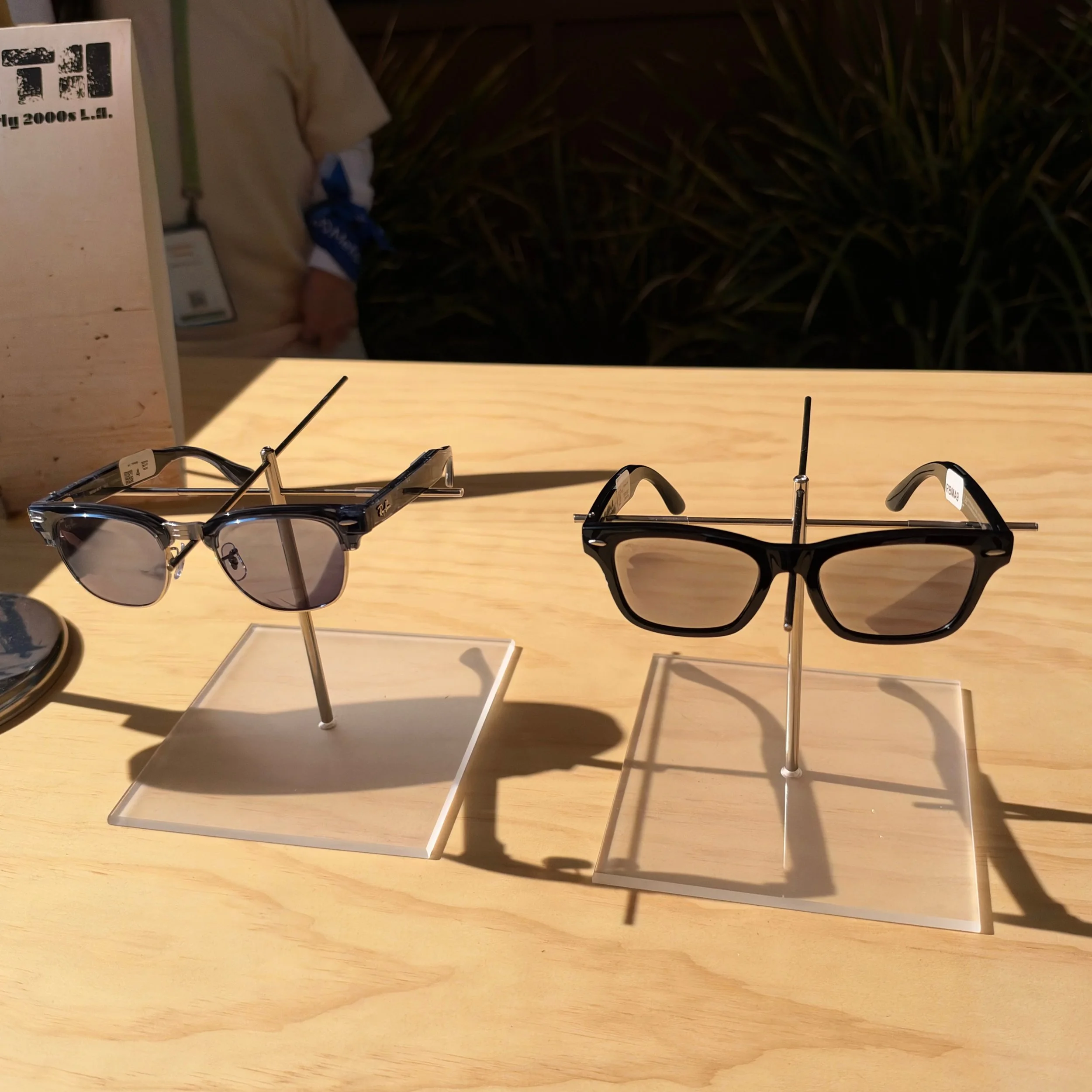
Every Kind of Smart Glasses
Meta’s approach is to split the market and just pull cameras off of some of its smart glasses and see if that helps. It might; when I wear Meta Ray-Ban Blayzer Optics — smart glasses from Meta that have a camera — my most used feature is listening to podcasts, not taking photos. I also use them to make phone calls because one of the microphones is located in the nose piece right near your mouth, making audio quality more effective than almost any normal headset or earbuds. (HP Poly headsets with a boom mic angled near your mouth also perform well, which is why HP still sells them.) The other reason to use audio-only Meta Smart Glasses is AI; this isn’t Meta’s strong suit compared to AI companies with hundreds of millions of subscribers (like OpenAI) or ties to other ecosystem pieces (like Google and Apple), but Meta AI models are competitive. At Meta Connect 2026, Meta showed off a preview of Muse on smart glasses, and the ability to direct agentic AI from your glasses could be a compelling use case.
Of course, Meta started building this product well before there was a backlash; it seems that the original goal was just to hit lower weight and price points. Meta is launching two audio-only smart glasses styles and indeed, both are slightly lighter than models with imaging modules and start at $349. That is less than other Ray-Ban-branded smart glasses, but more than Meta’s self-branded glasses with cameras.
If you DO want cameras on your glasses, Meta has plenty. The new Ray-Ban Meta Gen 3 adds an extra microphone (six in total) to the existing model’s already exceptional audio input. Battery life is boosted by another hour as well. There are a dizzying array of styles, including new ones like classic Aviator, a new color for Kylie Jenner’s cat eye style, and a new celebrity collaboration with Lisa. The ex-Blackpink singer’s glasses have a unique plush case and come with a mystery box charm pack-in that will almost certainly drive up prices on the secondary market (the dog wearing the cone of shame is the rarest).
What if you’ve been waiting to buy the Meta Ray-Ban Display? That has been sold out nearly since launch, but Meta says that supply is now catching up to demand. The Display glasses are now going to be available for sale online, and Meta says that its long-delayed international rollout will begin shortly. Note that Meta did not announce any hardware updates, just availability. My pair of non-prescription Meta Ray-Ban Display has mostly sat in a drawer after initial testing because the product can only support a single prescription in a fairly narrow range; my eyes need progressives for real-world use.)
Pay-for-Hearing with Meta Smart Glasses

Meta is launching a new feature for its smart glasses that help with mild hearing loss. This FDA-approved feature will launch this fall starting with Meta Smart Glasses, i.e., the ones without Ray-Ban branding or displays. By default, Hearing Assistance is omnidirectional, boosting voice frequency range all around you. The app offers a directional mode where head tracking and beam forming microphones combine to focus on whichever speaker you are looking at – a crucial capability in loud restaurants and business meetings. I got a demo wearing earplugs to imperfectly simulate hearing loss and Meta’s feature definitely worked under those constraints. The feature isn’t free: you have to pay for the software with a one-time fee ($150) or as part of a Meta subscription. Meta points out that even an over-the-counter hearing aid costs more, which is true. Monetizing R&D costs is how you run a business, but in Meta’s case it’s a shame that it needs to charge for Hearing Assistance because focusing on accessibility with its glasses could really help its brand image.
Meta is hardly alone in tackling this market. Essilor-Luxottica, Meta’s design and distribution partner, has its own set of hearing aid glasses, Nuance Audio. Nuance Audio Plus prices start at $699 with both prescription and non-prescription lens variants; Hearing Asssistance on Meta Smart Glasses is a direct competitor. Apple is also pitching its AirPods Pro 3 earbuds as hearing assistance devices at no additional cost, as do many other competitors, especially Jabra – which has a line of prescription-only hearing aids as well. However, there are social cues at play: if you are wearing earbuds people think that you can’t hear them or don’t want to hear them; if they see you wearing glasses, they just think you need glasses. Consumers may balk at Meta’s pricing structure, and competitors like Google may include similar hearing assistance features free with their smart glasses for differentiation. But there is room in the market for Meta’s approach.
Meta VR Glasses – Most of an Apple Vision Pro for a Fraction of the Price and Weight
The most ambitious product that Meta launched at Connect 2026 is a VR headset that looks like an oversized pair of rounded sunglasses: Meta VR Glasses. This magnesium glasses-and-tethered-puck combination delivers a significantly better VR experience than a Quest 3 (which will stay in the line) and a lot of the experience of an Apple Vision Pro for a fraction of the price, size, and weight. The interaction model is different from both the Quest and the Meta Ray-Ban Display: instead of requiring handheld controllers like the Quest or a neural band like Display, the VR Glasses use eye tracking and six world-facing cameras to respond gaze and hand gestures. If this sounds a lot like Apple Vision Pro or Galaxy VR, it is. In my 30 minute hands-on with the VR Glasses I found the interface polished and effective – more like the Apple Vision Pro that leans heavily on eye tracking than the Galaxy VR, which is more dependent on cameras picking up your gestures. Meta has done really good work here.
The glasses portion of VR Glasses weighs 100g, which felt reasonable on my face; you should be able to wear this for hours, not short sessions. It is made of magnesium for weight and heat dissipation. The glasses contain six cameras looking in all directions, including down, so the system will pick up gestures down near your waist. The temples have spatial audio speakers. There are also a pair of 2.5K per eye “Infinite Display” microOLED panels with 37 pixel PPD (pixels per degree, a measure of pixel density) and 85 degree FoV (Field of View). Quest 3 was 25 PPD, and this is an easily noticeable improvement. The rest of the system is connected via an optical cable (it can be disconnected on both ends) where the power and compute lives. This large puck runs a Qualcomm Snapdragon XR2 Gen 2 Reality Elite chipset and contains the battery and a fan. You won’t hear the fan when immersed in content, but you will feel the fact that the unit isn’t overheating in your pocket.
VR Glasses are built on Meta’s HorizonOS, just like Quest. This means that Quest’s entire software library will run natively on VR Glasses, provided that you pair a set of controllers. Meta said that 75 apps will be optimized for the VR Glasses’ gaze and gesture control at launch. VR classic Beat Saber – which Meta owns – is one of them, and it’s a flagship experience. Beat Saber has been reimagined as a music punching and swiping game – more Dr. Strange and Shang-Chi, less Jedi Knight with lightsabers. It was fun and within minutes my bad shoulder was hurting; it’s a great workout.
You can connect VR Glasses to anything with a Displayport over USB, which means that it can act as a virtual display for Windows or Macs. If you’re a masochist and you want to work natively inside the headset, VR Glasses can produce a virtual keyboard and trackpad on any flat surface. This worked for me about as well as all virtual keyboards do: you can use it if you have to, and Meta was touting employees who can type over 100 wpm on it, but you will not want to. Thwacking your fingers on a hard surface is painful, and it will register errors that autocorrect will make worse. You can pair Bluetooth keyboards and mice; native HorizonOS productivity apps are weak, but VR Glasses with a Logitech Keys2Go and a mouse can be an incredibly small, portable, and private system if you’re working inside a browser.
The best use case for VR today is immersive entertainment, and VR Glasses look great. Meta is arranging sports experiences with ESPN (I briefly rewatched the end of the NBA Finals from behind the backboard) and 2D and 3D experiences with all the major content players. Disney is providing backgrounds that sync with the content on screen for titles like Avengers: Endgame. I found them distracting but I expect non-cinephiles will think they’re fun. VR Glasses are the first wearables to support IMAX Enhanced. There’s very little content that takes advantage of that, but lots that will take full advantage of Dolby Vision and Dolby Atmos. Take VR Glasses on an airplane and the middle seat and crying baby disappear. You can do this with an Apple Vision Pro, but the case is large enough to qualify as your personal item. You can do this with XREAL ONE for a lot less money (and I do) but Meta is offering higher resolution, a wider field of view, and a lot more capability.
Muse is integrated into the operating system – or at least it will be, as I did not get to demo it, and you can be certain that Meta would have done so if it was ready.
It’s not perfect. Unlike Snaps SPECS, Meta VR Glasses are not see-through, so you can’t wear them everywhere or all the time. You really shouldn’t expect to wear XREAL Aura everywhere, either, and those are see-through AR. In my hands-on time, I could see noticeable lag in passthrough occlusions (like moving your hands or just quickly turning your head). The 85 degree FoV is bigger than Quest 3, but slightly smaller than Apple Vision Pro (about 100 degrees); in practice, you can have three virtual displays in front of you in Meta VR Glasses, but you’ll only have one entirely in frame at any time. Similarly, resolution (about 2500x2200 per eye) is better than Quest 3 but still worse than Apple Vision Pro (3660 x 3200 according to iFixit). For older people, this will limit VR Glasses productivity use cases. I could easily read text in the virtual displays but doing so for more than a few minutes would give me a fairly severe eyestrain headache. Younger eyes will likely have no problem with this use case – many people already use Quest 3 headsets for work and VR Glasses are a dramatic improvement over that.
Meta will release VR Glasses in Spring 2027 for $1299. Given what Meta is delivering, this is a bargain. I expect most consumers will hesitate to spend this much on a non-essential – VR is still a tough sell, and Quest 3 is a more affordable entry point if all you want is fitness and VR gaming. But for everyone who said they would buy an Apple Vision Pro if only it was cheaper and lighter, Meta VR Glasses delivers. It’s going to be an easy recommendation for frequent fliers and people who want a big personal screen in a very small apartment.
Meta’s New Goal: Find a Way for AI to Become a Platform, Monetize Agentic Transactions
Muse is Meta’s personal agent platform. Muse doesn’t do anything that ChatGPT, Gemini, or Anthropic can’t do if you use apps like Gemini Spark or set them up on a cluster of Mac Minis. It’s just easier. Muse makes agentic AI accessible: you run Muse on your iPhone or Mac, you name and customize a cute avatar that you tell to do something, you give it permissions to the services that Meta has built Connectors to, and it runs on its own in a virtual machine on Meta’s servers, checking in with you during and after task completion. Muse is free, and this combination of easy, useful, and free has catapulted Muse to the top of Apple’s download chart. At Connect 2026, CEO Mark Zuckerberg explained the business model: he intends for Muse to remain free, with Meta taking a percentage of transactions initiated by Muse AI agents. This also explains the prioritization of the Connectors that Meta has built: there’s a lot of shopping and travel. Meta is now allowing developers to build their own Connectors as well.
Do users trust Meta for this? Early adopters certainly do – at least enough to download the app and test things out – but Meta is aware that it needs to improve for Muse to grow. At Connect 2026, Meta announced that it is working on an encrypted Muse Confidential VM as a way to provide more security – and privacy – where nobody other than the user can see or access what’s in the virtual machine – including governments and Meta itself. Meta is also working on adding discretion to its algorithms so that Muse better understands what you do or don’t want to share in different contexts (in an interview with Joanna Stern, the example Mark Zuckerberg used is pregnancy). These steps are absolutely necessary. Perhaps other companies would hold off launching until the full security model is locked down; Meta’s approach is to put something out there that it deems good enough, see if there is market demand, and then further harden security and privacy.
Meta Charm: Meta Beats Rivals to the AI Tamagotchi Market
At the tail end of the Meta Connect keynote, Mark Zuckerberg pulled off a bit of a coup by revealing a small personal AI device: the Muse Charm. Handheld AI devices are a bit of an obsession in Silicon Valley, with some hoping that they will displace smartphones. They won’t, although personal AI devices could supplement the smartphone just like other wearable and handheld devices). Early personal AI devices failed (Humane.Ai’s Pin) or were undercooked (Rabbit’s R1, though the team did eventually make it usable with software updates). OpenAI is working with Jony Ive’s team to build a ChatGPT device of some kind, Lenovo has shown off Project Maxwell AI pendant, and Apple is rumored to be working on any number of different designs, including wearables and smart devices that look like the Pixar lamp logo.
All that Meta said publicly on stage was that it exists and that Meta plans to sell it before the end of the year. According to my sources at Meta, the Muse Charm is a small handheld device with a 2” OLED display, speaker and microphones, both front and rear facing cameras, compute (almost certainly from Qualcomm), battery, and connectivity that includes 5G. There is a carrying/wrist strap, and people are expected to dangle it on their wrist or clip it to bags. In Mark Zuckerberg’s hand it looks like a souped up Tamagotchi, virtual pet gadgets popular in the late 1990’s. The Muse Charm’s specs list reads like a pebble-shaped phone, which could be powerful but unlikely to be cheap enough to be an impulse buy. (Remember, one reason for Muse’s initial success is that it is free.) Of course, with 5G, U.S. carriers will be eager to finance it and add it as a device on your subscription, so perhaps that is Meta’s distribution model.
For Techsponential clients, a report is a springboard to personalized discussions and strategic advice. To discuss the implications of this report on your business, product, or investment strategies, contact Techsponential at avi@techsponential.com.